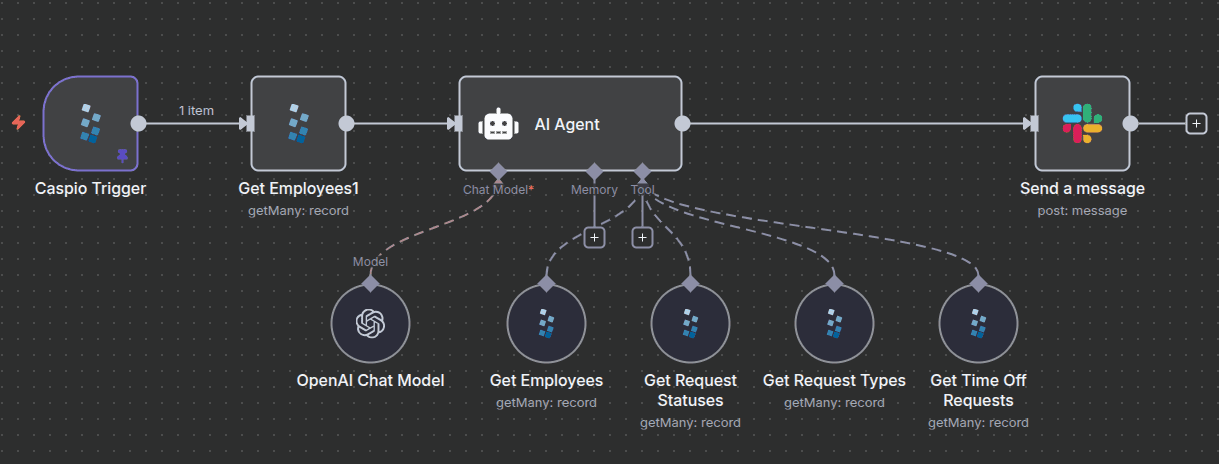
What This Template Does
When someone submits a time-off request, this workflow handles the entire approval process automatically:
- Triggers on a new request submitted through your Caspio form
- Checks team calendars for date overlaps and coverage gaps
- AI summarizes who else is out, flags any conflicts, and assesses impact
- Sends a Slack message to the manager with request details, conflict summary, and approve/deny buttons
- Writes back the manager's decision to Caspio automatically
No more digging through calendars or forgetting to respond. The manager gets everything they need in one message and makes the call with a single click.
Stack Details
- Trigger: Caspio webhook on request submission
- Calendar: Google Calendar API (or Outlook) to check team availability
- AI: Summarizes conflicts and coverage impact
- Manager Interface: Slack interactive message with approve/deny buttons
- Update: Writes decision back to Caspio, updates the team calendar
What the Manager Sees
The Slack message includes:
- Employee name and requested dates
- Number of days
- Team members already off during that period
- Deadline or coverage conflicts (if any)
- Approve and Deny buttons
- Link to the full request in Caspio
Customization Options
- Switch to Microsoft Teams instead of Slack
- Add multi-level approval chains
- Include PTO balance checks before sending
- Route approvals based on request length or department
- Auto-add calendar holds on approval